OpenShift Ecosystem & RHOAI 3.x Control Plane
The Operator Ecosystem for Models-as-a-Service
Background
The business mandate is to transition from consuming external foundation model tokens to producing your own tokens to power internal AI agents, applications, and solutions. To deliver Large Language Models (LLMs) as a governed, shared resource across your enterprise, we must build a highly available, robust platform.
In OpenShift, this Models-as-a-Service (MaaS) foundation relies primarily on Operators. This module serves as a standalone guide to preparing your greenfield environment. By installing this specific combination of infrastructure, serving, and governance operators, you lay the groundwork required to run an OpenShift AI cluster with GPUs to deliver AI at scale.
This module provides an order of installation of the required operators to deploy an Red Hat OpenShift AI Platform.
Why Rely on Operators?
Operators are software extensions for Kubernetes that act as automated administrators. They encode human operational knowledge into software to manage applications and their components.
-
The win: You eliminate manual intervention for complex, day-two operational tasks like handling upgrades, reacting to failures, and managing backups.
-
The benefits: Operators ensure consistent, repeatable installations and provide constant health checks. Software vendors embed their domain-specific knowledge into the operator, meaning your AI platform handles complex failure recovery automatically.
Architecture: How Operators Work in OpenShift
OpenShift heavily utilizes Operators as a fundamental part of its architecture and management model. To successfully configure your MaaS platform, you must understand these core concepts:
-
Operator Lifecycle Manager (OLM): This is a built-in OpenShift feature that simplifies finding, installing, and managing Operators. You will interface with the OLM through the OperatorHub (or "Ecosystem" in OpenShift 4.20+).
-
Custom Resources (CRs) and Controllers: Operators function using a "controller" pattern. They watch for and manage "Custom Resources" (CRs), which are extensions of the Kubernetes API. When you define a desired state in a CR (e.g., "Deploy an OpenShift AI environment with KServe enabled"), the Operator’s controller continuously reconciles the current cluster state with your desired state.
-
Cluster vs. Add-on Operators: OpenShift uses Cluster Operators (managed by the Cluster Version Operator) to run core system functions. For our AI platform, we will be installing optional Add-on Operators managed by the OLM.
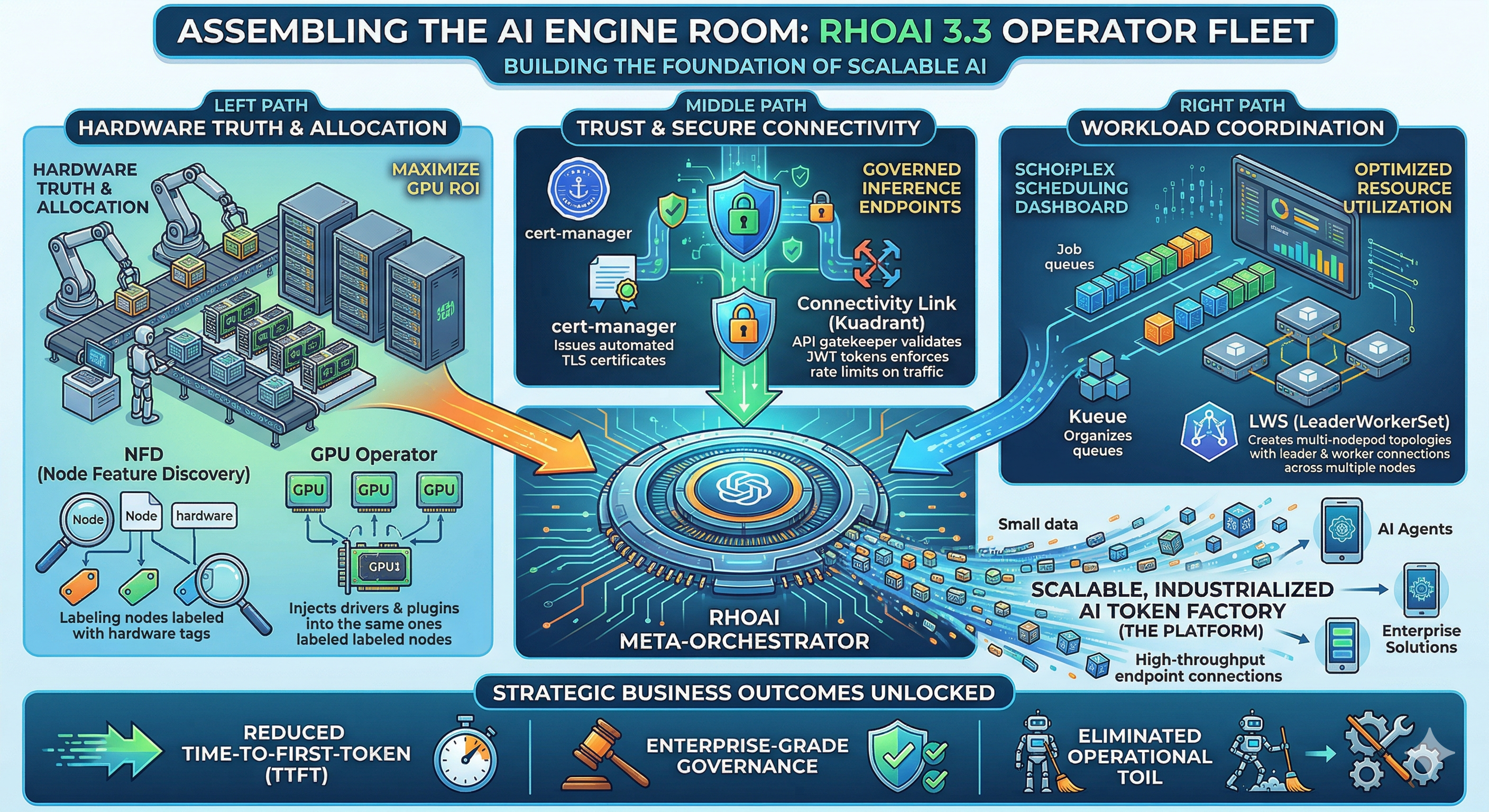
The MaaS Operator Stack
To build a generative AI application platform that provides AI Model Inference at scale, we need a specific combination of operators. Let’s categorize these into three distinct layers:
1. Core & Infrastructure Operators
These operators provide the foundational hardware detection, acceleration, and overarching platform management.
-
Red Hat OpenShift AI Operator.
-
Node Feature Discovery (NFD) Operator.
-
Hardware Accelerator Operators.
-
Cert-manager Operator.
2. Operators for Inference at Scale (MaaS)
To safely and efficiently serve LLMs to your enterprise, you must handle networking, security, and distributed workloads.
-
Red Hat Connectivity Link Operator (v1.2+).
-
Leader Worker Set Operator.
3. Operators for Distributed Workloads & RAG
If your platform requires advanced job queuing:
-
Red Hat build of Kueue Operator:
or Retrieval-Augmented Generation (RAG) capabilities: (not part of this course)
-
Llama Stack Operator: Deploys and manages environments optimized for RAG and agentic workflows, integrating inference models with vector databases (like Milvus or pgvector).
-
Observability Operators: The Cluster Observability Operator, Tempo Operator, and Red Hat build of OpenTelemetry deploy a stack to collect metrics, traces, and alerts for troubleshooting platform health.
Lab: Installing the OpenShift AI Foundation
In the lab, your goal is to install the baseline OpenShift AI Operator and its immediate hardware dependencies so the cluster is ready for MaaS configuration.
|
Prerequisites:
Access to an OpenShift cluster. cluster-admin privileges. Worker nodes equipped with accelerators (e.g., GPUs). (required for phase 2) |