Making the RHOAI Model Catalog Work for You
Industrializing GenAI: Operationalizing the RHOAI Model Catalog
Reduce guesswork. Enforce compliance. Deploy with confidence.
In the enterprise AI landscape, the challenge is no longer just finding a generative AI model—it is ensuring that model is safe, performant, compliant with corporate policy, and easily accessible to your internal teams.
To understand the architecture of OpenShift AI, you must distinguish between two highly complementary components: the Model Registry and the Model Catalog.
-
A model registry acts as a central repository for administrators and engineers to register, version, and manage the lifecycle of AI models before configuring them for deployment. Think of it as the "title office" for your AI assets.
-
The model catalog, conversely, is the "showroom." It provides a curated library where data scientists and AI engineers can discover and evaluate the available generative AI models to find the best fit for their use cases.
The core business value of the catalog lies in reducing the time, cost, and operational risk associated with GenAI deployments through five key pillars.
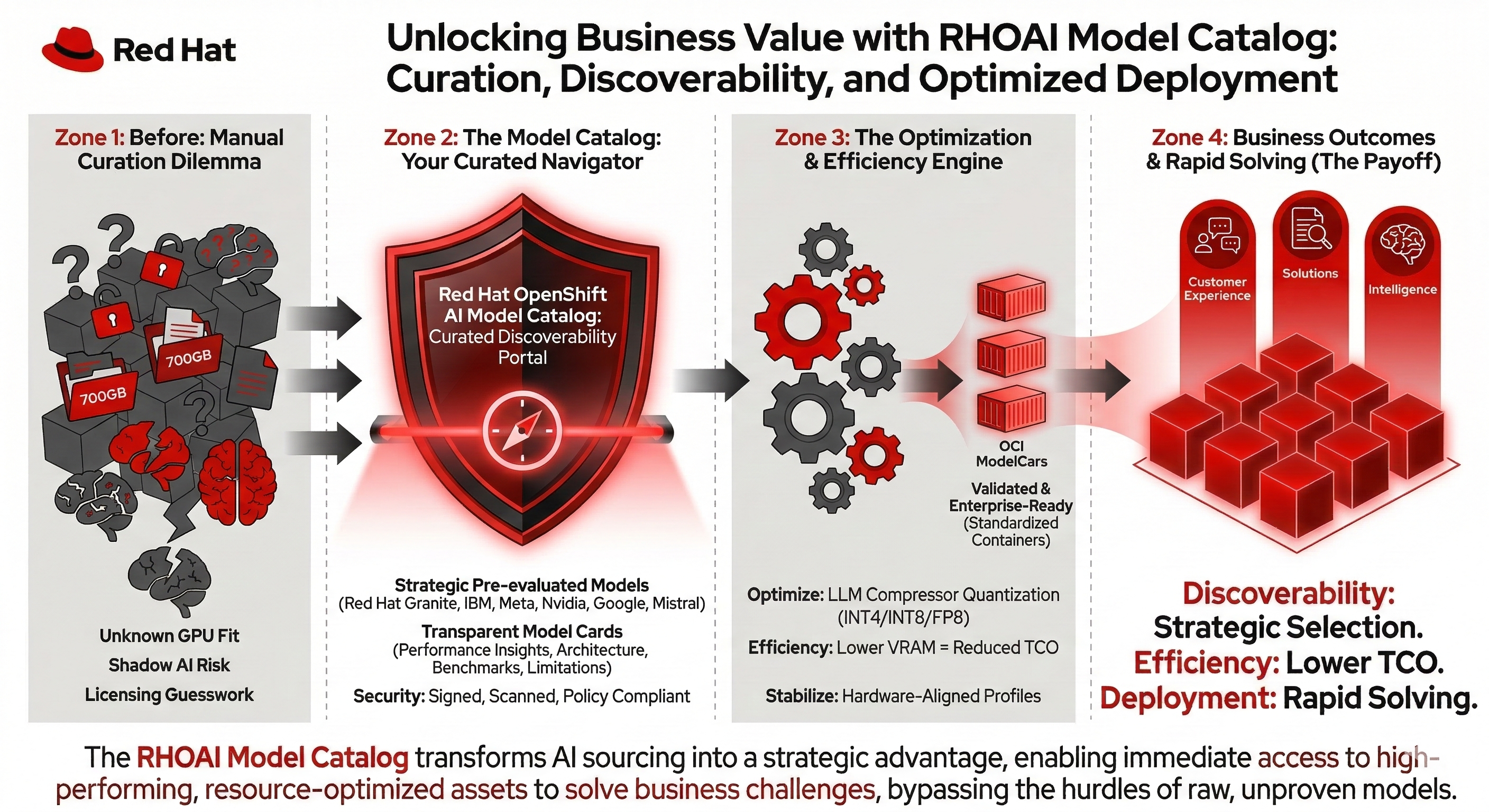
1. Validated Content & Strict Compliance (Mitigating "Shadow AI")
Deploying raw, community-sourced models introduces severe "Shadow AI" risks. OpenShift AI provides a default catalog featuring models from providers like Red Hat, IBM, Meta, Nvidia, Mistral AI, and Google. Models carrying the Red Hat Validated badge are benchmarked by Red Hat for performance and quality using open-source evaluation datasets.
New in 3.3: Curation is not just about what is provided; it is about what is permitted. The model catalog now provides an administrative capability to selectively hide, disallow list, or remove specific models from the visible catalog. This critical feature ensures compliance with internal security, policy, or regulatory restrictions.
2. Custom Model Integration (Your Private Showroom)
The model catalog is a flexible portal designed to expose your organization’s unique AI assets. OpenShift cluster administrators can configure a custom model catalog source by adding an entry to the model-catalog-sources config map. This allows you to provide your data scientists with a single, unified interface for both trusted third-party foundation models and your own proprietary, fine-tuned assets.
3. Optimization & Hardware Breadth (Controlling TCO)
Hardware availability is the primary constraint for GenAI. The catalog addresses this by offering models optimized via advanced quantization techniques (like INT4 and FP8), allowing massive models to run on fewer or less expensive hardware accelerators.
New in 3.3: OpenShift AI continues to expand its enterprise hardware validation. Model serving with IBM Spyre AI accelerators is now Generally Available (GA) on the IBM Power platform , and models are validated for use with IBM Z systems.
4. Transparency via Advanced Performance Insights
To eliminate the "black box" of AI performance, the model catalog provides comprehensive model validation data, including performance benchmarks and hardware compatibility.
New in 3.3: You can now use advanced search and filtering, for example, on throughput and latency for benchmarked hardware profiles, so users can quickly find validated models for their use case and available resources. Engineers can evaluate critical metrics like End-to-End Latency (E2E), Time to First Token (TTFT), and Tokens Per Second (TPS) before provisioning expensive compute.
5. The Future of Governance: Model-as-a-Service (MaaS)
New in 3.3 (Technology Preview): OpenShift AI now includes Model-as-a-Service (MaaS) to address resource consumption and governance challenges associated with serving large language models (LLMs). MaaS provides centralized control over model access and resource usage by exposing models through managed API endpoints, allowing administrators to enforce consumption policies and usage tracking across teams.
Your Mission: Operationalize the Catalog
In this module, you will move beyond simply browsing models. You will learn to use the catalog as a tool for architectural decision-making and supply chain management.
You will execute the following workflow:
-
Test Drive (Simulation): Navigate the UI to interpret advanced Performance Insights, size hardware requirements, and explore deployment strategies.
-
Extend the Supply Chain (Lab): Take on the role of a Platform Engineer to inject a Custom Private Source into the catalog.
-
Enforce Governance: Learn how to utilize the new Allow/Disallow capabilities to secure your AI supply chain.
Ready to explore? Let’s start by looking at the architecture that makes this possible.